What's new
Panelica Community Forum

Welcome to the official Panelica Community Forum — the central hub for server administrators, developers, and hosting professionals. Register a free account today to access technical discussions, product announcements, feature requests, and direct support from the Panelica team. Be part of the growing community shaping the future of server management.

Laravel Deployment Pipeline Rules

tailadmin

New member
Beta Access
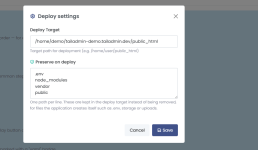
Laravel projelerini ayağa kaldırmak için bir kural seti var mıdır? public_html içine direk deploy ettiğimde node_modules ve vendor klasörleri oluşmuyor, deploy dizinini değiştirip rsycnc ile node_modules ve vendor'u kopyalıyorum ama diğer dosyalar dışarıda kalıyor, livewire veya filamnetphp kurulumu yaptığımda public içinde'de ek dosyalar oluşuyor, Onları nasıl yönetebiliriz.
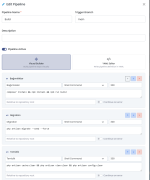
1787265027360.png
1787265045545.png
 
Hatta pipeline oluştur ekranında Laravel, Vuejs SPA, Vuejs SSR gibi seçenekler olsa tıklandığında otomatik olarak adımlar oluşturulsa harika olur gibi. Hatta kopyalama yapılacak ise rsync gibi klasik komutlar için pipeline adımında adım türü seçimi olsa, dosya kopyalama seçildiğinde kaynak ve hedef seçilse tadından yenmez gibi olur.
 
Hello,

Thank you for the detailed report and for the screenshots — they made the situation very clear.

We looked into it: the "Preserve on deploy" field acts as an exclude list during deployment, so any path listed there is intentionally NOT copied from your repository to the deploy target. When build folders such as node_modules, vendor or public are added to that list, your pipeline's build output ends up being skipped — which is exactly the behavior you observed.

We are preparing a UI-side update to make this much clearer: the deploy settings screen will now warn you when a build-output folder is placed in "Preserve on deploy", explaining that those folders should be left out and that only runtime files your app creates (.env, storage, uploads) belong there. This improvement will arrive in an upcoming release.

We also appreciate your suggestions around pipeline presets and a dedicated file-copy step — we have noted them and are continuing to improve the pipeline experience.

Thank you again for your feedback and for helping us make Panelica better.

Panelica Team
 
Last edited:
Back
Top