
Panelica Shield is the malware scanner built into the panel (Security > Panelica Shield). It checks website files against three signature sources and shows the scan live while it runs:
Official WordPress core and plugin files are recognised by their release checksums and skipped. A core file outside wp-content that differs from the official file is reported as a modified core file instead.
Availability: panelica-server 1.0.551 / panel-frontend 4.5.354 or later, currently on the beta update channel (Panel Settings > System Updates > Stable + Beta). No extra license or add-on is needed. ClamAV is not touched; it keeps scanning mail.
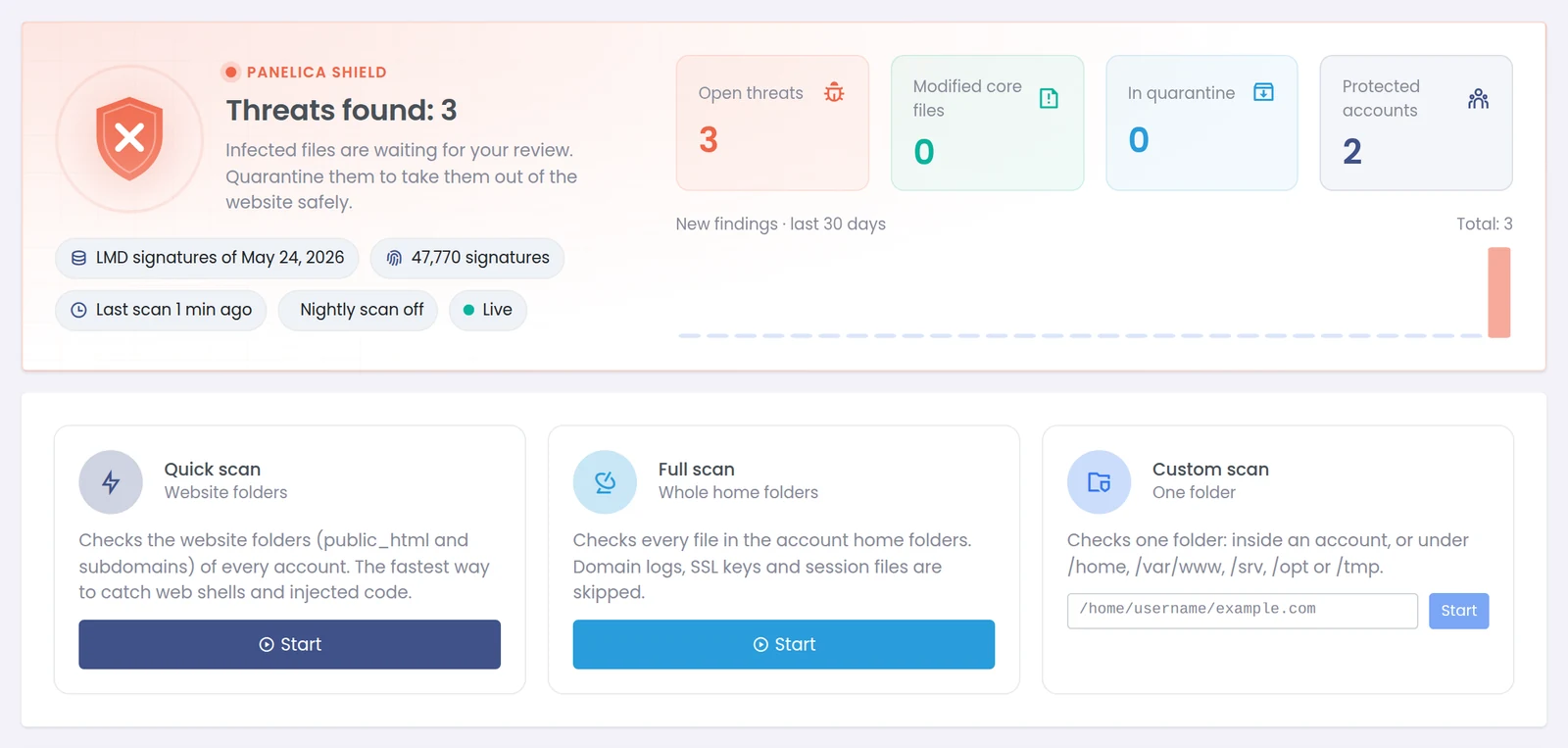
The Shield page: status at the top, the three scan types below.
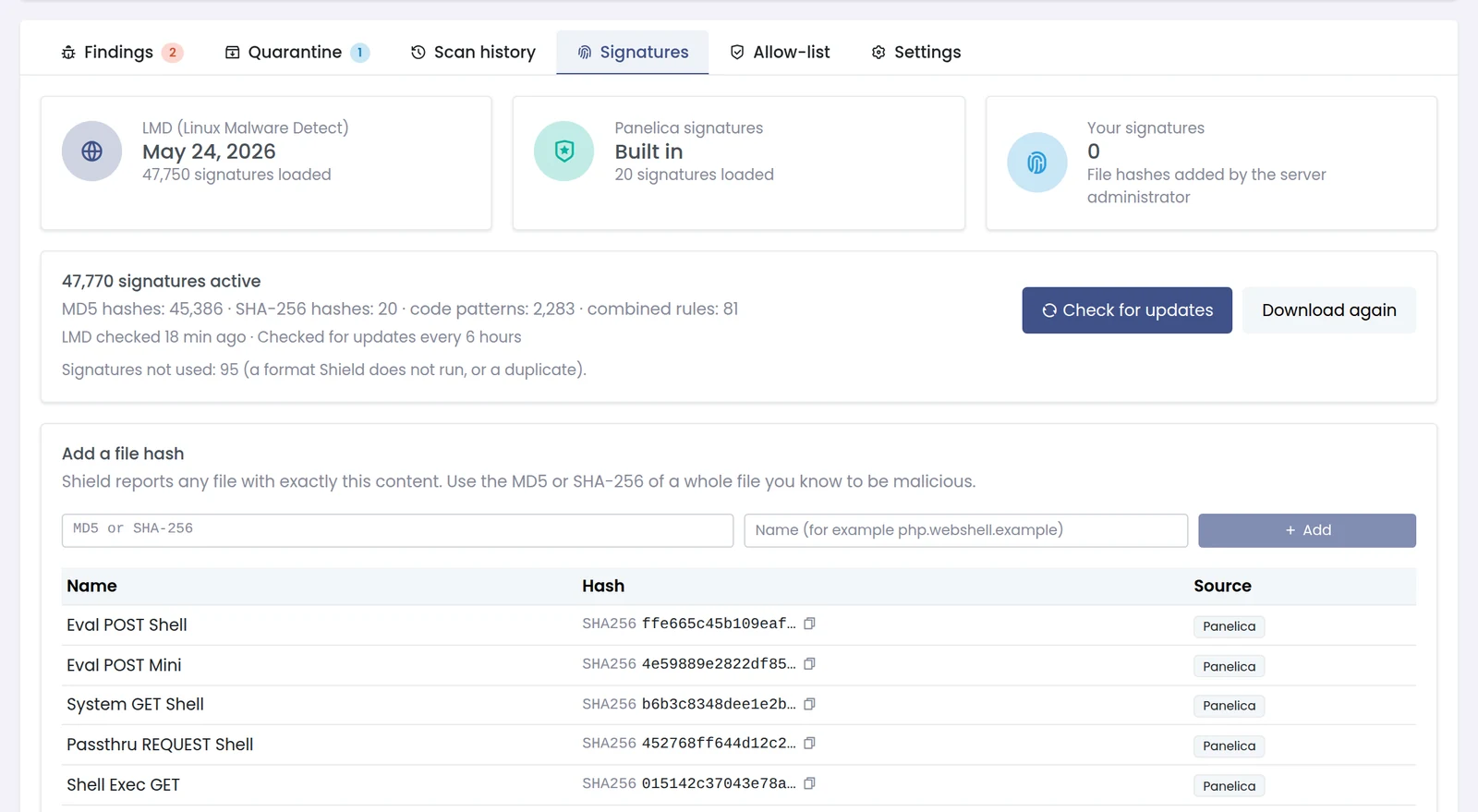
Open the Signatures tab. You should see the LMD set with its version and signature count. If it says "Not downloaded yet", wait a few minutes after a panel restart, or press Check for updates.
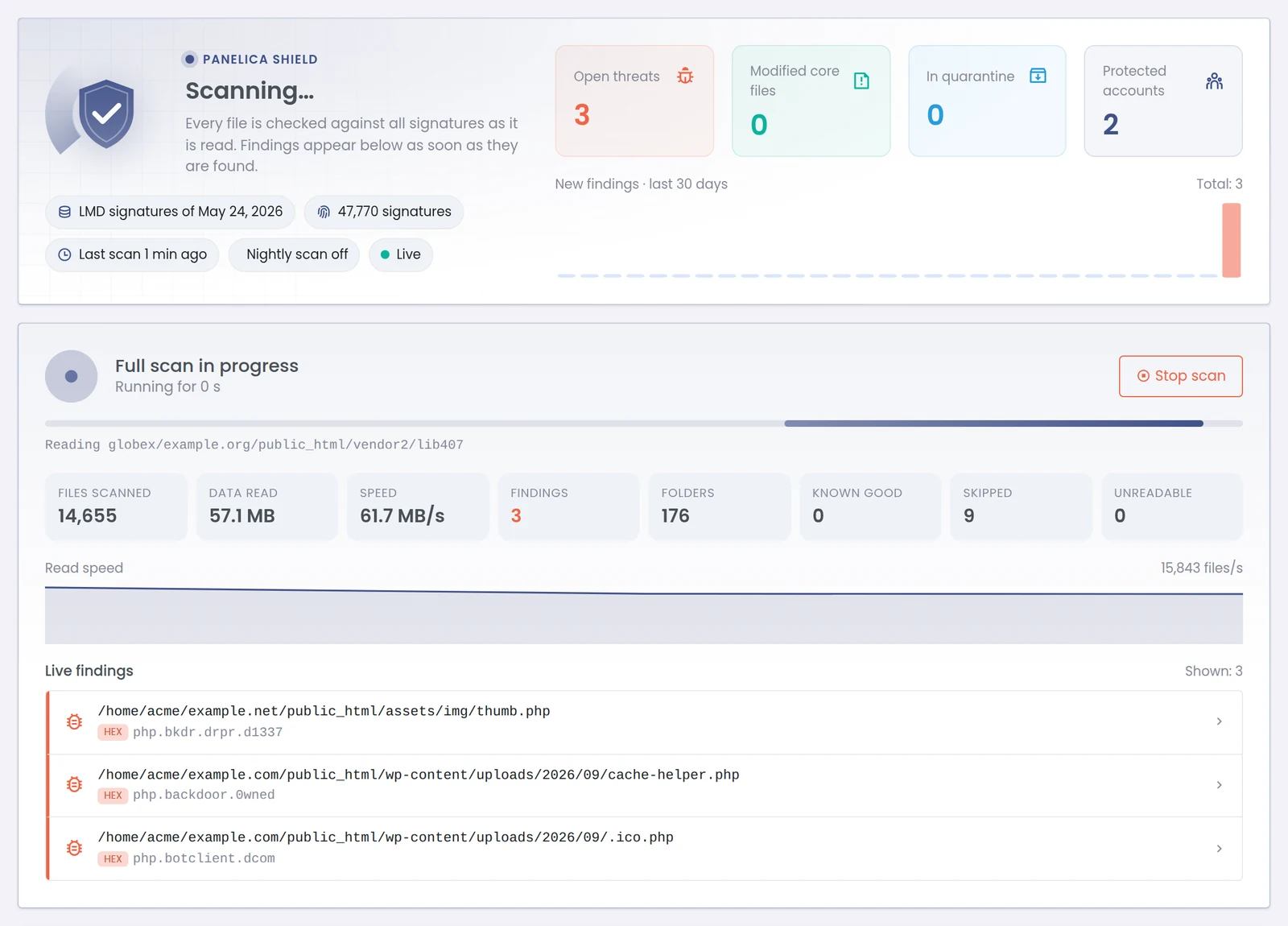
Press Start. The page switches to a live view: files scanned, data read, speed, known-good files skipped, unreadable files and findings. Findings appear in the live feed immediately. Stop scan keeps everything found so far.
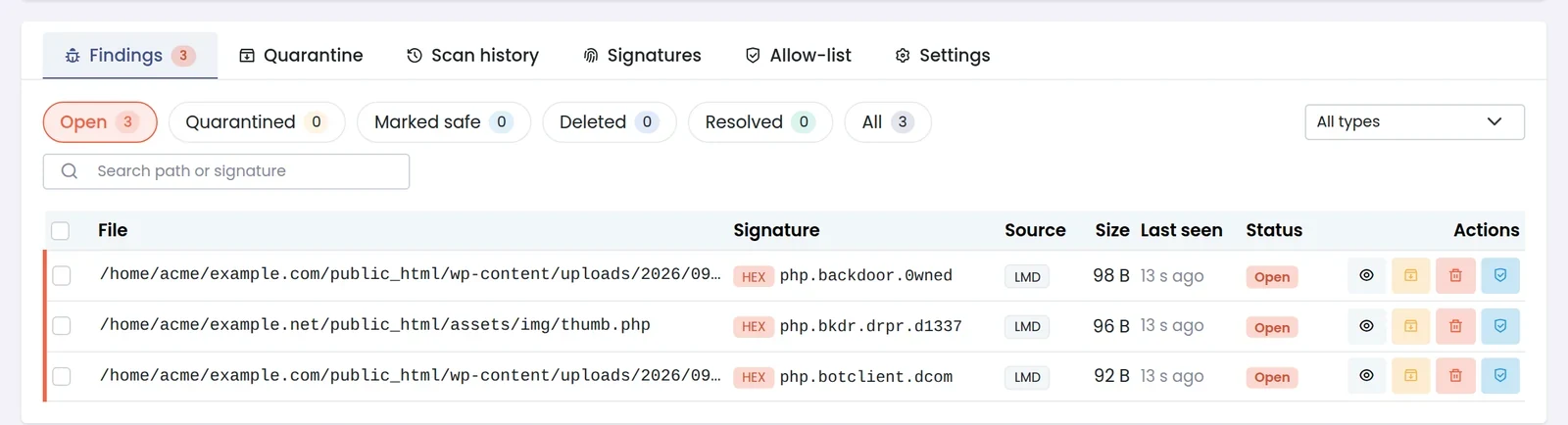
The Findings tab lists file, signature, source (LMD / Panelica / Custom / Integrity check), size, last seen and status. Click the eye icon to open a finding: owner UID:GID, permissions, modification time, SHA-256, MD5, every matching signature, and the start of the file with the matched lines highlighted.
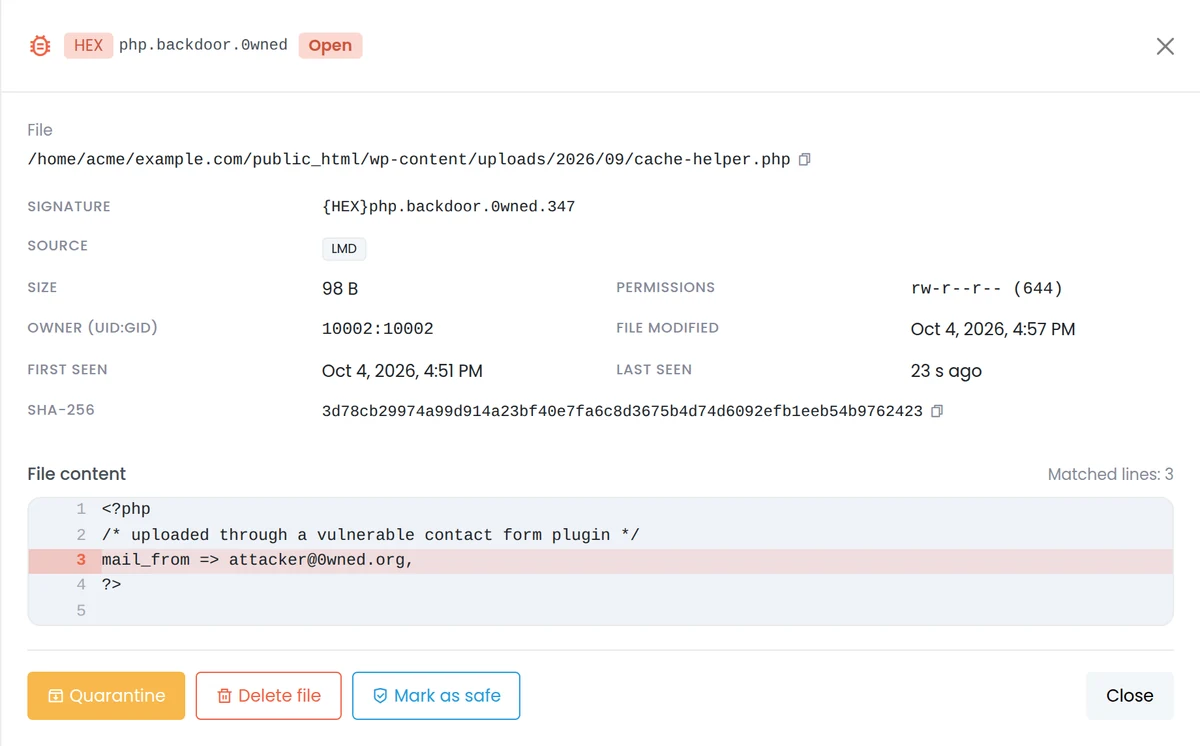
For each finding you can:
The Quarantine tab keeps the original location. Restore puts the file back with its original owner and permissions; Restore and mark as safe also stops it from being reported again.

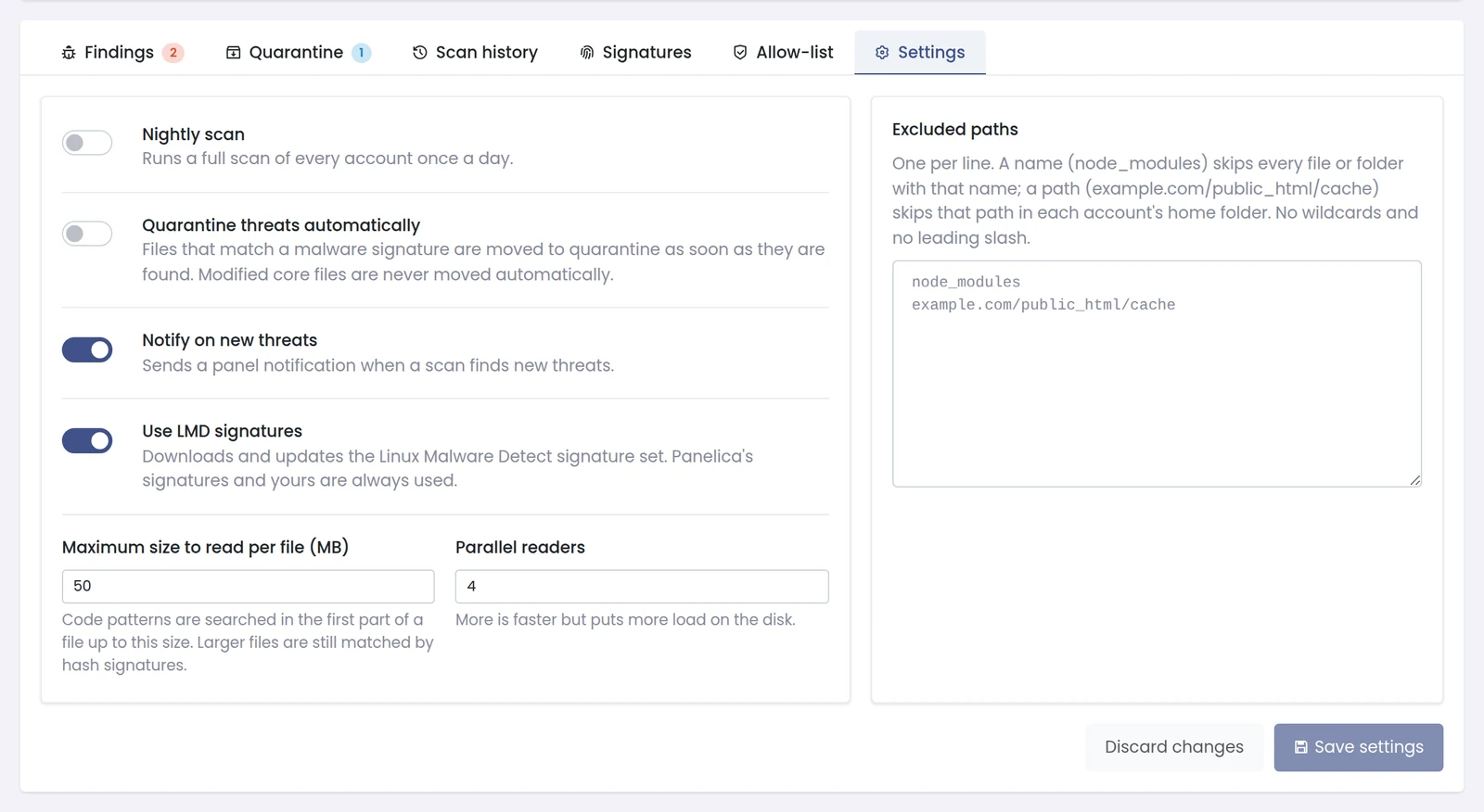
In Settings:
By default only the root administrator. You can grant it to administrators or resellers in the panel's permission settings; they then see only their own accounts' findings and totals, even during a server-wide scan.
Questions, false positives or a sample Shield missed? Reply here - include the signature name (or the file's SHA-256) and we will look at it.
The full write-up, with how the signature engine and quarantine work: https://panelica.com/blog/panelica-shield-built-in-malware-scanning-for-every-hosting-account
- LMD signatures (Linux Malware Detect by R-fx Networks) - downloaded automatically a few minutes after the panel starts, SHA-256 checked, updated every 6 hours.
- Panelica signatures - shipped inside the panel binary, updated with every panelica-server release.
- Your own hashes - add the MD5 or SHA-256 of any file you know is malicious.
Official WordPress core and plugin files are recognised by their release checksums and skipped. A core file outside wp-content that differs from the official file is reported as a modified core file instead.
Availability: panelica-server 1.0.551 / panel-frontend 4.5.354 or later, currently on the beta update channel (Panel Settings > System Updates > Stable + Beta). No extra license or add-on is needed. ClamAV is not touched; it keeps scanning mail.
The Shield page: status at the top, the three scan types below.
Open the Signatures tab. You should see the LMD set with its version and signature count. If it says "Not downloaded yet", wait a few minutes after a panel restart, or press Check for updates.
| Scan | Reads | Use it for |
|---|---|---|
| Quick | public_html and subdomains of every account | Fast check for web shells and injected code |
| Full | Every file in the home folders (logs, SSL keys and session files are skipped) | After an incident, or nightly |
| Custom | One folder (root can also pick /home, /var/www, /srv, /opt or /tmp) | One site or one suspicious directory |
Press Start. The page switches to a live view: files scanned, data read, speed, known-good files skipped, unreadable files and findings. Findings appear in the live feed immediately. Stop scan keeps everything found so far.
The Findings tab lists file, signature, source (LMD / Panelica / Custom / Integrity check), size, last seen and status. Click the eye icon to open a finding: owner UID:GID, permissions, modification time, SHA-256, MD5, every matching signature, and the start of the file with the matched lines highlighted.
For each finding you can:
- Quarantine - moves the file where no website can run it. Reversible.
- Delete file - removes it without keeping a copy.
- Mark as safe - Shield stores the file's SHA-256 and skips that exact content (for this account, or for every account). If the file changes, it is checked again.
The Quarantine tab keeps the original location. Restore puts the file back with its original owner and permissions; Restore and mark as safe also stops it from being reported again.
In Settings:
- Nightly scan - off by default; when on, a full scan runs at the hour you pick (03:00 server time by default).
- Quarantine threats automatically - off by default. Modified core files are never moved automatically.
- Notify on new threats - on by default.
- Maximum size to read per file - 50 MB by default; bigger files are still matched by hash.
- Parallel readers - 4 by default (1-16). Lower it on slow disks.
- Excluded paths - one per line; a name like node_modules or a path relative to each home folder.
By default only the root administrator. You can grant it to administrators or resellers in the panel's permission settings; they then see only their own accounts' findings and totals, even during a server-wide scan.
- Start with notifications only on servers with many customers, then decide about automatic quarantine.
- A web shell usually means a vulnerable plugin or theme. Update or remove it, otherwise the file will come back.
- Shield finds files that are already on disk. Keep ModSecurity and the firewall enabled to stop the upload in the first place.
Questions, false positives or a sample Shield missed? Reply here - include the signature name (or the file's SHA-256) and we will look at it.
The full write-up, with how the signature engine and quarantine work: https://panelica.com/blog/panelica-shield-built-in-malware-scanning-for-every-hosting-account