What's new
Panelica Community Forum

Welcome to the official Panelica Community Forum — the central hub for server administrators, developers, and hosting professionals. Register a free account today to access technical discussions, product announcements, feature requests, and direct support from the Panelica team. Be part of the growing community shaping the future of server management.

Solved Deploy Webhook secretkey

tailadmin

New member
Beta Access
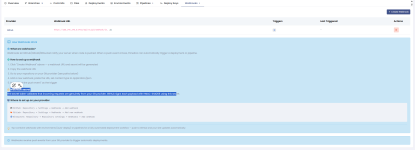
Webhook tanımlarken kullanacağımız secret key'i bulamadım. Panelin bunu oluşturup, bu webhook ile ilişkendirmesi gerekiyor sanırım.

1787147047193.png
1787147092510.png
 
Hi, following up with the exact location so there is no guesswork. The deploy secret is created and shown by the panel itself; it lives inside the repository, on its Webhooks tab, not under the global Settings menu.

Exact steps (replace YOUR-PANEL and REPOSITORY_ID with your own):

1) Open Git Manager:

2) Open the "Repositories" tab and click your repository. The address becomes:

3) Click the "Webhooks" tab (you can go straight there):

4) Click "Create Webhook" and choose your provider (GitHub, GitLab, Bitbucket or Custom).

The moment the webhook is created, the panel:
- generates a random 32-byte secret,
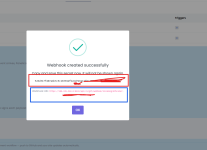
- shows it once in a dialog with the note "Copy and save this secret now. It will not be shown again.",
- and shows the webhook URL you paste into your Git provider, in this form:

Copy both right there. The secret is stored encrypted and is never shown again, so if you miss the dialog, just delete the webhook and create a new one to get a fresh secret and URL.

Then, on your Git provider:
- GitHub: Settings -> Webhooks -> Add webhook -> Payload URL = the URL above, Secret = the generated secret, Content type = application/json.
- GitLab: Settings -> Webhooks -> URL = the URL above, Secret token = the generated secret.

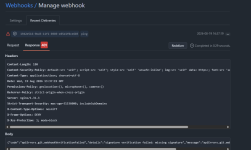
Every incoming call is verified with that secret (HMAC-SHA256 for GitHub and Custom, the token header for GitLab). Requests that fail verification are rejected with 401, and only a validated push triggers a deploy.

One clarification to avoid mixing them up: the "Webhooks" entry under the main Settings menu is a different feature (outgoing notifications the panel sends to external services). For deploy-on-push, always use the Webhooks tab inside the repository, as above.
 
Evet haklısınız modal içindeymiş, üstteki metin gibi siyah olunca fark etmemişim. Yazı fontu farklı aslında ama sanırım bu iki alanı kopyalama düğmesi olan iki mini kart şekilende göstersek gösterilebilse aşırı fark edilebilir olabilir. Evet özellikler var fakat sanki ben bulmakta zorlanıyor gibiyim. Bu tarz önemli bilgilerin daha dikkat şekilde sunuluyor olması bende özel bir renk bir arka plan yoksa önemsiz bilgilendirme metnidir algısı yaratıyor. Üzerindeki kocaman gizli anahtarı kopyalayın ve kaydedin uyarısını siz yazınca fark ettim açıkçası. Bu tarz metinleri turuncu, veya arka planı modaldan farklı border içinde görmeye alışık olduğum için gözümden kaçmış.

1787163024501.png
 
Panel adresi olarak domain bağladım, github ta adresin ssl doğrulamasını kontrol et seçimi var, ip adresli web hook girince onu pasif yapmak gerekiyor fakat ssl li panel domaini girince ssl seçeniğini aktif kullanabiliyorum. Panel eklememe rağmen burası ip adresi ile veriyor, gerçi daha sonra panelin domaini değiştirilirse önceden oluşturulan webhooklar geçersiz olur ama sanki domainlide gösterilse fena olmaz gibi.
 
Thank you, both suggestions were spot on, and both are now implemented.

1) The creation dialog no longer shows the secret and URL as plain text. They are now two separate, highlighted boxes, each with its own label and a copy button, under a colored "copy this now, it is shown only once" warning banner, so the secret can no longer be missed.

2) The webhook URL now uses your panel domain instead of the IP address whenever a panel hostname is configured, so GitHub SSL verification works without turning it off. It falls back to the IP only when no hostname is set. As you noted, if the panel domain is later changed, previously created webhook URLs would need to be recreated, but that trade-off is unavoidable since the URL has to point to a concrete address.

Both changes are rolling out as a panel update (backend for the URL, frontend for the dialog). Thanks again for the clear, well-explained feedback, it made both easy to act on.
 
Back
Top