What's new
Panelica Community Forum

Welcome to the official Panelica Community Forum — the central hub for server administrators, developers, and hosting professionals. Register a free account today to access technical discussions, product announcements, feature requests, and direct support from the Panelica team. Be part of the growing community shaping the future of server management.

Solved cloudflare create credientals problem

tailadmin

New member
Beta Access
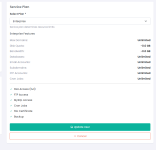
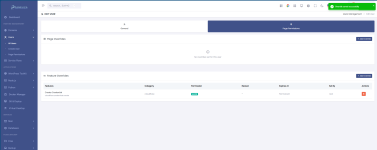
Normal kullanıcı oluşturup, enterprise plan ile, paneline girip domains altındaki cloudflare sayfasına girdiğimde, cloudflare ttokeni tanımlayamıyorum, plada bu yetkiyide görmedim ama panelde sayfayı görüyorum ama token ekleyemiyorum. Kullanıcının page permissions paneline girip featture overrides olarak create credianetals eklediğimde bunu yapabildim. İşlem yapmayacaksam menüde görmemeliyim, görüyorsamda bunu kontttrol edebilecek ayar panellerinin ekrana olması iyi olur.
 

Attachments

  • 1786960616131.png
    1786960616131.png
    111.8 KB · Views: 3
  • 1786960682317.png
    1786960682317.png
    47.5 KB · Views: 3
Thanks for the detailed report — what you ran into is by design, and the way you solved it is exactly the intended path. Let me explain the model so it is predictable:

Why the page is visible but the action is not allowed
Panelica separates two things:
  • Page permissions — which menu entries / pages a role can see.
  • Feature permissions — which actions inside a page a role can perform (e.g. cloudflare.credentials.create).
The Cloudflare page is available to the USER role so the customer can see the status of a domain that an admin/reseller has already connected. Creating (storing) a Cloudflare API token, however, is a privileged action: a token gives control over the customer's whole Cloudflare zone, so its default is ROOT and ADMIN only. That is why the page opened but the create button was rejected.

How to grant it to a specific customer (what you did)
Users → All Users → Edit user → Page Permissions tab → Feature Overrides → + Add Override → category "cloudflare" → "Create Credential" ([ICODE]cloudflare.credentials.create) → ALLOW[/ICODE]
Overrides can be permanent or time-limited, and they are logged (Set By = who granted it). This is the correct, auditable way to open a privileged action for one account without changing the default for every customer on the server.

You can try the same flow on the public demo (role credentials are shown on the login page, the instance resets every 6 hours):
https://demo.panelica.com/users → edit any USER → Page Permissions → Feature Overrides.

Your two suggestions
  • "If I cannot act, do not show the button/menu" — agreed for the action: we will hide/disable the create control when the feature permission is missing, instead of letting the request fail. The page itself stays visible because read access is intentional.
  • "Let me control this from the plan" — noted as a feature request; today plan features cover resource limits and the core services, while privileged actions are handled per user (or per role in Page Permissions) rather than per plan.
 
Back
Top