What's new
Panelica Community Forum

Welcome to the official Panelica Community Forum — the central hub for server administrators, developers, and hosting professionals. Register a free account today to access technical discussions, product announcements, feature requests, and direct support from the Panelica team. Be part of the growing community shaping the future of server management.

[BUG] MySQL Root Password Never Stored After Setup — Databases Show "Unknown", CLI Import Fails, phpMyAdmin Import Limited to 512MB

Drakon

New member
Summary:MySQL root password is not stored or accessible anywhere on the server, making it impossible to provision databases that show as "Unknown" in the panel or perform large SQL imports via CLI.


Panelica Version:1.0.214


OS Version (Ubuntu/Debian):Ubuntu 24.04 LTS


Steps to Reproduce:


  1. Create a new domain and add a MySQL database via the Databases panel
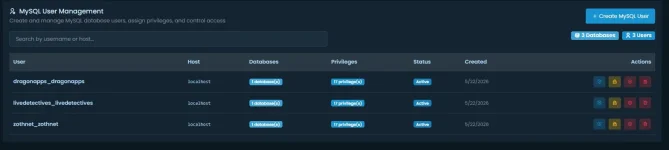
  2. Note the database shows status "Unknown" with 0 tables and 0.00 KB
  3. Attempt to import a large SQL dump via CLI using the assigned database user
  4. Receive ERROR 1049: Unknown database — the database does not exist in MySQL despite appearing in the panel
  5. Attempt to connect as MySQL root to manually create the database: mysql -u root → Access denied (no password)
  6. Search all config files, panel_settings PostgreSQL table, and panelica.conf for MySQL root credentials — none found; panelica.conf shows root_password = SETUP_WIZARD_WILL_SET and is never updated after setup

Expected Behavior:Databases created through the panel should be immediately provisioned in MySQL with correct grants. The MySQL root password set during the Setup Wizard should be stored in a retrievable location (e.g., panel_settings or a secure credentials file) so the server administrator can perform CLI-level database operations.


Actual Behavior:


  • Databases created via the panel show as "Unknown" status and do not exist in MySQL
  • panelica.conf retains the placeholder root_password = SETUP_WIZARD_WILL_SET after setup — password was never written
  • panel_settings PostgreSQL table contains no MySQL root password entry
  • No .cnf file or secrets file anywhere under /opt/panelica/ contains the MySQL root credentials
  • MySQL root access via socket as Linux root is denied
  • The panelica db create CLI command exists but the CLI cannot authenticate (was blocked by missing /etc/hosts localhost entry — separate issue)
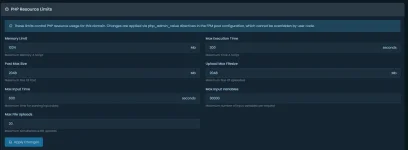
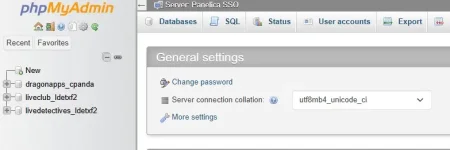
  • phpMyAdmin client_max_body_size is hardcoded at 512MB in /opt/panelica/etc/panel-nginx/conf.d/gui-tools.conf with no panel UI to increase it, making imports of databases larger than 512MB impossible through the web interface

Error Messages / Logs:


<span><span>ERROR 1045 (28000): Access denied for user 'root'@'localhost' (using password: NO)<br></span></span><span>ERROR 1049 (42000) at line XXXXX: Unknown database 'zothnet_wpzn'</span>

Also: panelica CLI returned dial tcp: lookup localhost on 8.8.8.8:53: no such host until manually adding localhost to /etc/hosts — the installer appears to not write a localhost entry.


Screenshots:Available — showing "Unknown" database status in MySQL Databases panel with 0 tables and 0.00 KB size.

 

Attachments

  • preview (1).webp
    preview (1).webp
    19.3 KB · Views: 3
  • preview (2).webp
    preview (2).webp
    24 KB · Views: 3
  • preview (3).webp
    preview (3).webp
    17.5 KB · Views: 3
  • preview (4).webp
    preview (4).webp
    21.6 KB · Views: 3
  • preview.webp
    preview.webp
    24 KB · Views: 3
Summary:MySQL root password is not stored or accessible anywhere on the server, making it impossible to provision databases that show as "Unknown" in the panel or perform large SQL imports via CLI.


Panelica Version:1.0.214


OS Version (Ubuntu/Debian):Ubuntu 24.04 LTS


Steps to Reproduce:


  1. Create a new domain and add a MySQL database via the Databases panel
  2. Note the database shows status "Unknown" with 0 tables and 0.00 KB
  3. Attempt to import a large SQL dump via CLI using the assigned database user
  4. Receive ERROR 1049: Unknown database — the database does not exist in MySQL despite appearing in the panel
  5. Attempt to connect as MySQL root to manually create the database: mysql -u root → Access denied (no password)
  6. Search all config files, panel_settings PostgreSQL table, and panelica.conf for MySQL root credentials — none found; panelica.conf shows root_password = SETUP_WIZARD_WILL_SET and is never updated after setup

Expected Behavior:Databases created through the panel should be immediately provisioned in MySQL with correct grants. The MySQL root password set during the Setup Wizard should be stored in a retrievable location (e.g., panel_settings or a secure credentials file) so the server administrator can perform CLI-level database operations.


Actual Behavior:


  • Databases created via the panel show as "Unknown" status and do not exist in MySQL
  • panelica.conf retains the placeholder root_password = SETUP_WIZARD_WILL_SET after setup — password was never written
  • panel_settings PostgreSQL table contains no MySQL root password entry
  • No .cnf file or secrets file anywhere under /opt/panelica/ contains the MySQL root credentials
  • MySQL root access via socket as Linux root is denied
  • The panelica db create CLI command exists but the CLI cannot authenticate (was blocked by missing /etc/hosts localhost entry — separate issue)
  • phpMyAdmin client_max_body_size is hardcoded at 512MB in /opt/panelica/etc/panel-nginx/conf.d/gui-tools.conf with no panel UI to increase it, making imports of databases larger than 512MB impossible through the web interface

Error Messages / Logs:


<span><span>ERROR 1045 (28000): Access denied for user 'root'@'localhost' (using password: NO)<br></span></span><span>ERROR 1049 (42000) at line XXXXX: Unknown database 'zothnet_wpzn'</span>

Also: panelica CLI returned dial tcp: lookup localhost on 8.8.8.8:53: no such host until manually adding localhost to /etc/hosts — the installer appears to not write a localhost entry.


Screenshots:Available — showing "Unknown" database status in MySQL Databases panel with 0 tables and 0.00 KB size.


Thank you for the report.

The issue has been reviewed by the engineering team and is currently under internal investigation. Relevant components and provisioning workflows are being analyzed.

Additional information and updates will be shared once the review process is completed.

We appreciate your feedback and contribution to improving Panelica.
 
Update — v1.0.222 is live and this report is directly addressed.

What changed (cPanel/Plesk-style compatibility for operators coming from legacy panels):

  • /root/.my.cnf (mode 0600)
    is now auto-generated, mirroring the MySQL root credential from
    /opt/panelica/panelica.conf into the exact file layout you remember
    from cPanel and Plesk.

    The standard:
    mysql
    mysqldump
    mysqladmin
    mysqlcheck
    mysqlimport
    mysqlshow
    mysqlbinlog

    commands work out of the box now with no flags.
  • Wrapper scripts
    in /usr/local/bin/ for those seven MySQL client utilities, so the
    muscle memory from older panels ("mysql" or
    "mysqldump db > out.sql" as root) works as expected without going
    through the panel.
  • Self-heal for existing servers:
    install.sh writes these on fresh installs, AND the backend now
    self-heals on startup.

    Meaning customers already on Panelica will get:
    /root/.my.cnf
    and the wrapper scripts populated automatically after applying this
    update — no reinstall needed.
  • Your separate observation about /etc/hosts
    missing localhost is also fixed at install time now.

A couple of clarifications on the original report:

Items 2 and 4
(DB root password "never stored" and root login impossible)
were observation artifacts from the missing /root/.my.cnf
convenience layer — not the panel losing the credential itself.

The DB root password is and always has been written into:
/opt/panelica/panelica.conf

right after the Setup Wizard.

What was missing was the legacy-panel-compatible
front-end on top of it:
/root/.my.cnf + wrapper scripts

that long-time cPanel/Plesk operators expect to find.

v1.0.222 ships exactly that compatibility layer.

phpMyAdmin 512MB upload ceiling
is also addressed in this release.

The MySQL Tuner UI now exposes:
upload_max_filesize
post_max_size
max_allowed_packet

as editable fields, so large imports no longer require
hand-editing nginx or php-fpm files.

Full changelog:
https://panelica.com/changelog/1.0.222

Please apply the update and let us know how the:
- database creation
- CLI root login
- large-import flows

behave on your end after the upgrade.

If anything still looks off, reply here with the exact command
and the output and we'll keep digging.

Thanks for the detailed report — this is exactly the kind of
feedback that gets things shipped fast.
 
Back
Top